
TelluVision
Privacy mode – disable alarms and video with one button
Camera stream and alarm controls have been combined into a single Privacy mode button, activated via a physical switch or directly from the user list from the Responder role. Previously, these were two separate settings — this update reduces complexity and ensures both are always activated together, so privacy protection can't be partially or accidentally left off.
Privacy mode is useful for staff or visitors who don't want the camera triggering unnecessary alarms, and who want to be sure no one can watch or listen while they're in the room.
-
Activated: camera LED turns red to confirm privacy mode is on.
-
Deactivated: click the button again on your way out.
-
Safety timeout: if not manually deactivated, the camera automatically returns to live monitoring after 60 minutes — so a forgotten reactivation doesn't leave the room unmonitored.
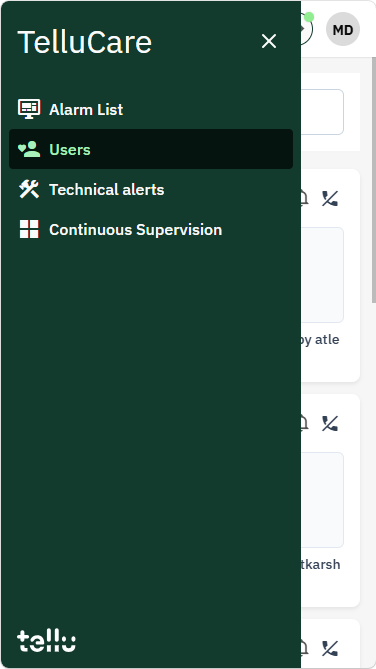
To activate privacy mode from the TelluGo app, go to “Users”…
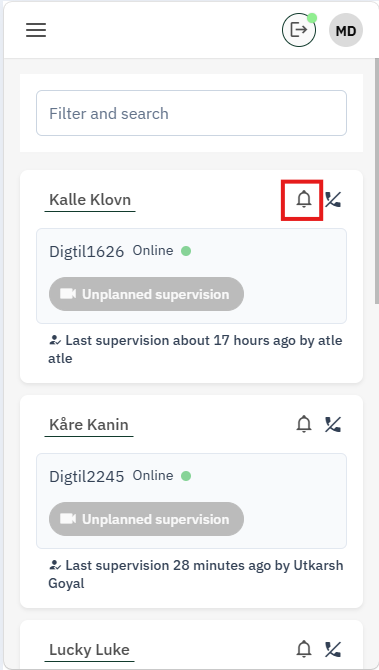
… and click on the bell next to the relevant user
PTZ control now limited to continuous supervision
Pan-tilt-zoom control has been consolidated from the Move button into a single Preset tab, where presets are also created and managed.
This is now limited to personnel with continuous supervision access. Continuous supervision is typically used for users who stay in a fixed position — a consistent camera angle, often framed on the face, is critical for monitoring. This is less useful for event-based or scheduled supervision, where the user's location in the room varies.
As a result, PTZ-related buttons are removed from the video player for everyone else — a cleaner, less cluttered interface for the majority of personnel who work with event-based or scheduled supervision.
For personnel with continuous supervision: responsiveness is improved, and presets can still be created using sliders, pinch gestures, or mouse wheel.
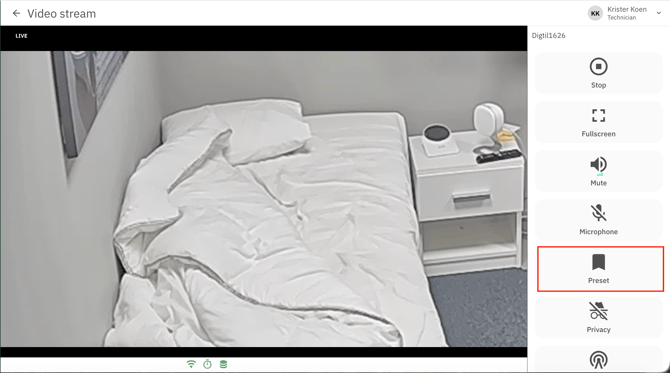
Enter one single tab to create and use presets
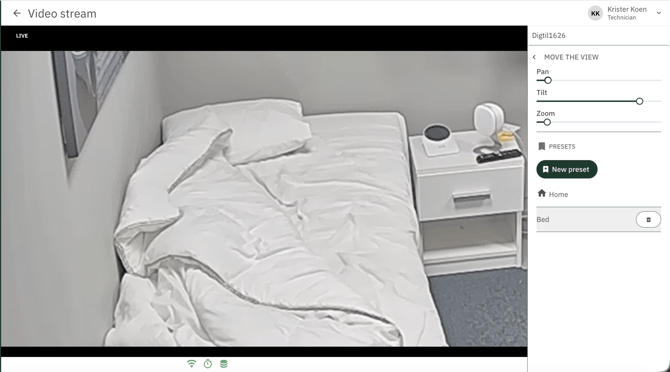
Adjust sliders and create a new preset to be used later
TelluVisit
Introducing Reminders
The first version of reminders is now available in TelluCare for health personnel. In the same way as a video meeting can be created, it is now also possible to create reminders concerning the user — for example a doctor's appointment or a visit to the care home. The user is notified when a reminder is created, and a notification is sent automatically 15 minutes before the scheduled time.
Please note that reminders on the user's side require the updated version of the user app TelluHome, which will be released later in September. Until then, reminders can be created and managed in TelluCare, but the user will not receive notifications. Going forward, the functionality will be extended so that the user can also confirm that a reminder has been completed where this is required.
Dialogg has been renamed to TelluHome in TelluCare
Following the renaming of the Dialogg app to TelluHome, all tabs and references to the app in TelluCare have been updated accordingly.
Changes to image sharing in the chat
Image sharing in the chat is now disabled by default for new users and new TelluHome accounts, rather than enabled by default. Where the functionality is needed, it must be actively enabled.
Notification settings for inactive users in Remote Pasient Monitoring
The notification settings for inactive users have been updated. Health personnel can now receive a task, "missing measurement or form", when a user has not submitted an expected measurement or form within a given time after the scheduled deadline. The time limit is configured under notification preferences in the follow up tab.